PDF Reader Zone
- 4.0
- Rating
- 10.00M
- Installs
- Free
- Price
 Analysis by App-foxy
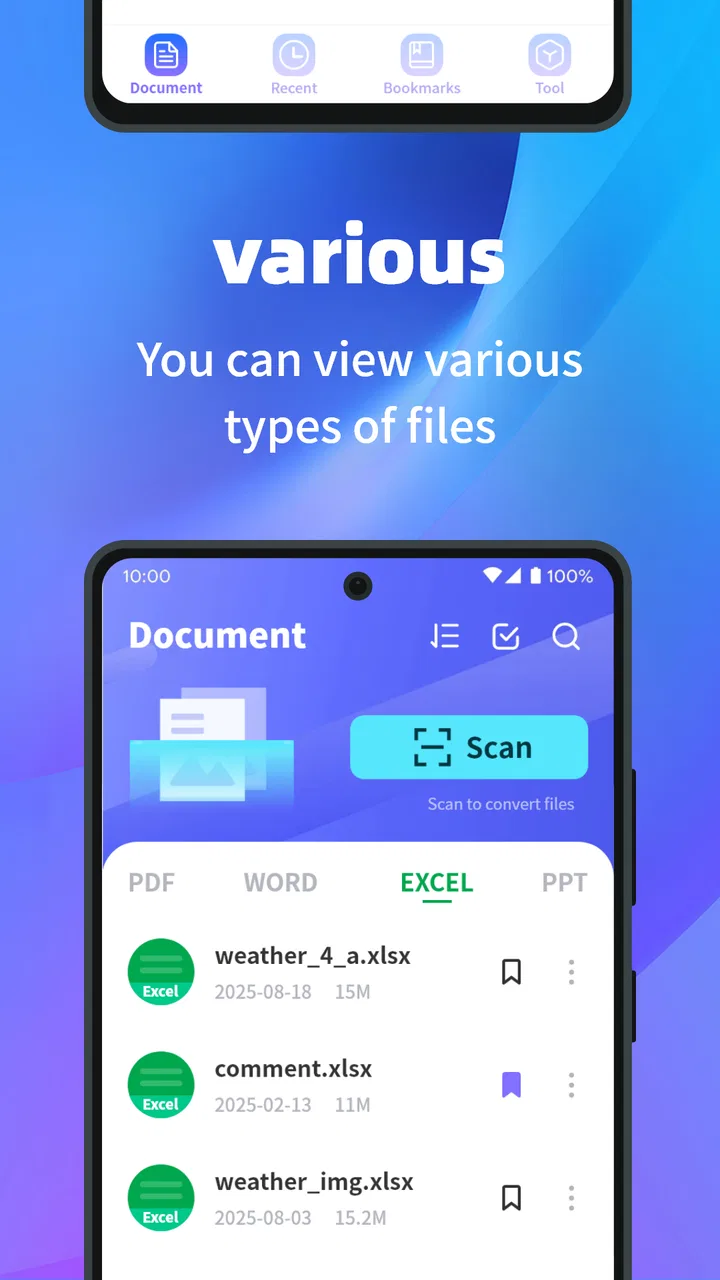
I spent time with PDF Reader Zone as a practical document tool rather than treating it like a simple file viewer. Its purpose is clear: open PDF files quickly, read them comfortably, and keep document-based tasks from becoming more awkward than they need to be. That makes it a natural fit for productivity, especially if your phone is often the place where you receive forms, manuals, receipts, study material, or work documents.
The app is free, aimed at everyone, and comes from P & L Studio. It has attracted over ten million installs and holds a 4.0 average from around eleven thousand ratings, which suggests that it has reached a broad audience while still leaving room for mixed experiences. I think that balance is fair. This is a useful everyday reader, but it is not automatically the best answer for every kind of PDF work.
How I use PDF Reader Zone in a normal day
My baseline workflow is deliberately simple. When a PDF arrives through email or a messaging app, I open it in the reader, check that the pages render properly, and move through the document at a comfortable pace. For short files, that is all I need. The benefit is not dramatic; it is the small convenience of having a dedicated place to read instead of relying on whichever app happens to claim the file first.
You May Also Like

 Blood Strike: 2.5 Anniversary
Blood Strike’s Loadouts Turn Every Drop Into a Tactical Gamble
A close look at Blood Strike’s custom loadouts: how fast access to signature weapons reshapes its battle royale rhythm, rewards preparation, and narrows the gap between fights.

 Pandora - Music & Podcasts
Pandora’s Music Is Easy to Start, but Harder to Recover
Pandora’s strength is its low-effort path from a seed to a station. Its weak spot is how much confidence it asks you to place in connection, setup, and quiet recovery.

 8 Ball Pool
 Is Built on Rivalries, Rematches, and Routine
A close look at the rivalries, rematches, shared routines, and unanswered safety questions that turn a quick pool match into a persistent mobile community.

 Samsung Music
’s Quiet Strength Is Playing What You Already Own
Its reach comes less from spectacle than from dependable access to a personal library. That simplicity is both the app’s strongest retention engine and its ceiling.

 AccuWeather: Weather Radar
AccuWeather Review: A Quick, Clear Forecast for Everyday Decisions
For everyday plans, the best forecast is the one you can understand quickly. AccuWeather makes rain timing, radar, and local conditions easy to act on, with a few trade-offs.

 Hill Climb Racing
Why Hill Climb Racing Still Turns Crashes Into One More Run
A tiny car, a bumpy hill and one more upgrade: Hill Climb Racing keeps resurfacing because its simple chaos makes every near-miss feel personal.
More From Our News Desk



That distinction matters on a phone. A PDF can look fine in a browser but become awkward when I need to return to it later, inspect several pages, or read for more than a minute. A dedicated reader gives the document a more focused setting. I can use it for a travel confirmation, a school handout, a product guide, or a document I need to review before replying to someone.
I also found it helpful to separate reading from editing in my expectations. The app’s store summary describes it as a document companion, with a short description centered on PDF reading. I therefore approach it primarily as a reader, not as a full office suite or a replacement for a desktop PDF editor. That keeps the experience straightforward and prevents disappointment when a task requires substantial document creation or alteration.
A realistic example is a workday in which a colleague sends a long policy document while I am away from my computer. I can open it, scan the pages, read the relevant section, and decide whether I need to respond immediately or wait until I have a larger screen. That is where the app earns its place: it reduces friction for quick document access without pretending that a phone is always the ideal workspace.
What I check before relying on a document
Before reading closely, I look at the whole file first. I move through a few pages, check whether text and images appear correctly, and make sure the document is not simply a collection of poorly rendered scans. This habit is more useful than it sounds. A reader can display a file, but that does not mean the source document is easy to search, readable at phone size, or suitable for detailed work.
For long PDFs, I avoid reading in one uninterrupted session unless the material is genuinely comfortable on the screen. I use the first pass to identify where the useful information begins, then return to those pages. This is a better workflow than repeatedly opening and closing the file while trying to remember where a particular section appeared.
People deciding whether to install it will probably wonder if it is suitable for school or work. My answer is yes for viewing assignments, reference material, instructions, and shared documents. It is less convincing as the main tool for writing notes, restructuring pages, signing forms, or preparing polished documents. If those tasks are central to your routine, a more specialized PDF suite will usually be the better choice.
Settings and habits that make reading easier
I recommend spending a little time checking the available reading preferences instead of accepting the first layout automatically. On a phone, small changes in how a page fits the screen can affect comfort more than people expect. A view that works for a single-page letter may feel inefficient for a narrow document, while a page-wide approach can be more practical when the text is small.
My preferred approach is to choose a viewing style based on the document, not personal loyalty to one mode. For a short form, I want to see the complete page so I understand its structure. For a text-heavy report, I care more about keeping the lines readable and avoiding unnecessary zooming. Switching habits between those two situations makes the reader feel more flexible.
I also keep the phone’s own display settings in mind. Brightness, text scaling, and system-level comfort options can influence a long reading session as much as the app itself. This is one of the less obvious lessons with mobile PDF readers: if the screen is uncomfortable, changing the document view alone will not solve the problem.
Another useful habit is to give each document a purpose before opening it. If I am checking a reference, I scan. If I am studying, I read in smaller sections and pause to summarize. If I am verifying a form, I inspect labels and page order carefully. Treating every PDF as the same kind of task makes the experience slower and can make a capable reader seem limited.
PDF Reader Zone runs on Android devices using Android 6.0 or later, so compatibility is broad enough for many older phones as well as newer ones. The current version is 1.2.3. I would still keep the app updated through the normal store process, particularly when document handling is important, because readers depend on reliable file rendering and stable behavior across different devices.
Repeatable patterns for faster document work
The fastest workflow I found is based on repetition rather than clever tricks. I keep a consistent sequence: open the file, inspect its length and layout, locate the useful section, read it, and close it only after deciding whether I need to return. This sounds basic, but it prevents the common habit of reopening the same attachment several times because I never established where the important information was.
For recurring documents, I use the same mental checkpoints each time. With an invoice, I look for the total and the relevant date. With a manual, I identify the contents and troubleshooting sections. With study material, I first locate headings and diagrams. The app does not need to know the purpose of the file for this method to work; the efficiency comes from having a repeatable reading pattern.
I also avoid zooming in too early. Enlarging the first page immediately can make navigation feel cramped, especially when I have not yet judged the document’s overall layout. I prefer to scan first, then zoom only when the text or detail requires it. Afterward, I return to a broader view so I do not lose my sense of where I am in the file.
When I need to compare information, I use a two-pass method. I read the first document for its general meaning, then open the second and look specifically for matching names, dates, instructions, or figures. Trying to compare everything at once on a small screen is tiring. A focused second pass is slower in theory but usually faster in practice because it reduces backtracking.
One trade-off is that a mobile reader is excellent for access but not always for organization. If I have a growing collection of reference files, I need a separate habit for naming, storing, or sorting them on the device. PDF Reader Zone can be useful once I reach a file, but it should not be mistaken for a complete personal document-management system. Users who need elaborate folders, collaboration, or workflow automation may prefer a broader productivity platform.
Where the app fits better than common alternatives
The usual alternative is opening a PDF inside a browser, email client, cloud-storage app, or file manager. Those options are convenient when I only need a quick glance, but they can feel inconsistent from one file to the next. A dedicated reader is more appealing when PDFs are a regular part of the day and I want a predictable reading environment.
Compared with a full office suite, this app is easier to understand because its role is narrower. I do not have to navigate a large collection of document-creation tools when my immediate need is simply to read a file. That simplicity is a strength for casual users, students checking shared material, and anyone who receives PDFs but rarely edits them.
The comparison changes when the job becomes collaborative or editorial. If I need advanced annotations, detailed form completion, page rearrangement, document conversion, or professional review controls, I would choose a more specialized application. A broad office suite may also be preferable when I need to move directly from reading into writing or spreadsheet work. PDF Reader Zone makes more sense when reading is the center of the task.
Another question many users have is whether a free reader is enough for important documents. For ordinary viewing, it can be. For legal, financial, academic, or workplace material, I would still verify the file carefully and keep the original source available. A reader displays content; it does not replace the responsibility to check that the correct document was opened or that every page is present.
Limits experienced users should understand
The main limitation is not that the app fails at its basic job; it is that basic reading has a clear ceiling. Once I move beyond viewing into serious document handling, I start wanting tools that belong to another category. That is not a criticism of the reader’s purpose, but it is an important buying decision. Installing it will not turn a phone into a full desktop publishing environment.
Small screens create another unavoidable constraint. Even a well-presented PDF can be tiring when it contains dense tables, wide diagrams, or tiny footnotes. I would use the app to inspect those documents, but I would not choose a phone as my only device for detailed analysis. A tablet or computer is still more comfortable for side-by-side comparison and extended editing.
Scanned documents can also be a special case. When a PDF is made from images rather than selectable text, reading may depend heavily on the quality of the scan. I would not assume that a reader can make every scan searchable or transform it into editable text. If optical character recognition is essential to your workflow, look for an app that explicitly focuses on that function.
Privacy-conscious users should also keep their normal document habits. I would avoid opening sensitive files on a shared phone, and I would be careful when forwarding or storing confidential documents. Those are sensible precautions for any PDF application, including this one. The app’s free price makes it easy to try, but “free” should not be confused with a complete answer to every security or records-management requirement.
The age rating is Everyone, which matches the straightforward nature of a general document reader. That makes it suitable for a household device, a student’s phone, or a family member who only needs to open shared PDFs. The more important question is not age but task: younger and older users alike may find it useful for viewing, while advanced professionals may quickly need additional tools.
My verdict after building a routine around it
After using PDF Reader Zone as part of a repeatable document routine, I see it as a sensible choice for people who want a focused way to open and read PDFs without committing to a large productivity suite. P & L Studio has kept the app’s identity easy to understand, and that clarity is valuable. I can recommend it to someone who regularly receives documents but does not need to edit every file.
The app is especially appealing if your current method is opening PDFs wherever they happen to appear and then struggling to return to them. A dedicated reader gives that everyday task a clearer home. It is also a reasonable starting point for students, families, and casual users because it is free, broadly compatible, and rated for everyone.
I would steer away from it if your work depends on advanced annotation, signatures, OCR, document conversion, collaboration, or intensive page management. In those cases, choosing a purpose-built PDF editor from the beginning will save frustration. I would also choose a larger screen for long technical documents, even if I kept this app installed for quick checks.
My most practical recommendation is to combine the app with disciplined habits: inspect a file before deep reading, adjust the view to match the document, avoid unnecessary zooming, and use a two-pass method when comparing information. Those choices reveal the app’s real value. It is not a flashy all-in-one workspace, and it does not need to be. For dependable PDF access on an Android phone, its focused simplicity is the reason to try it.
With an average rating of 4.0 from over eleven thousand ratings and more than ten million installs, it has clearly become a familiar option for mobile document reading. My own conclusion is measured rather than enthusiastic: PDF Reader Zone is worth installing when your priority is opening and reading PDFs comfortably, while users who expect a complete document-editing toolkit should look elsewhere.
FAQs for PDF Reader Zone
01What features does PDF Reader Zone offer?
PDF Reader Zone offers a wide range of features, including the ability to view, annotate, and edit PDF documents. Users can highlight text, add notes, and even fill out forms directly within the app. It also supports cloud storage integration, allowing easy access to documents from services like Google Drive and Dropbox.
02Is PDF Reader Zone available for both Android and iOS devices?
Yes, PDF Reader Zone is available for download on both Android and iOS platforms. The app offers a consistent user experience across devices, ensuring that users can seamlessly switch between their smartphone and tablet without losing any functionality or data.
03Does PDF Reader Zone support offline access to documents?
Absolutely. PDF Reader Zone allows users to download documents for offline access, which is perfect for those who need to work on the go without a stable internet connection. This feature ensures that your important documents are always available when you need them.
04Are there any subscription fees or in-app purchases in PDF Reader Zone?
PDF Reader Zone is a free app, but it does offer premium features through in-app purchases. These may include advanced editing tools and enhanced cloud storage options. While the free version is quite robust, the premium version is designed for users who require more advanced functionalities.
05How secure is my data in PDF Reader Zone?
PDF Reader Zone prioritizes user data security with features such as password protection for sensitive documents and encrypted cloud storage options. The app ensures that your documents remain private and secure, whether they are stored locally or in the cloud.
Pros
- User-friendly interface for seamless navigation.
- Supports a wide range of file formats.
- High-speed rendering of large documents.
- Annotation tools are intuitive and precise.
- Offline access to saved documents.
Cons
- Free version has limited features.
- Occasional ads can disrupt workflow.
- Editing tools lack advanced options.
- Syncing issues with cloud services.
- Requires frequent updates for stability.

PDF Reader Zone
Gallery